
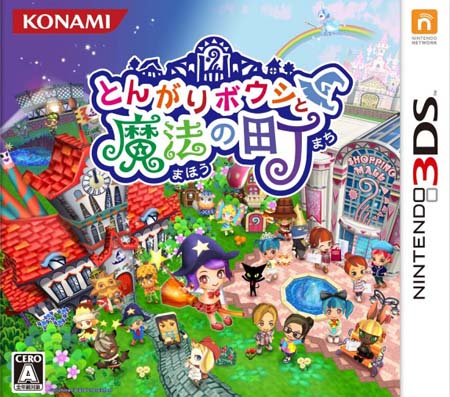
Tongariboshi To Maho no Machi is a Japan-only Nintendo 3DS simulation title that Konami released on December 20, 2012. This page covers the [Decrypted] 3DS (JPN) ROM build, which is the format you need to run the game on PC through the Citra 3DS emulator. If you have been hunting for a working copy of this niche Konami release, the decrypted package here is the practical route: it is already unpacked from the original encryption, so Citra can read it without extra conversion steps.
The download is a compact 122MB RAR archive. Inside you get the decrypted ROM file, and the only real prerequisite on the software side is a current Citra installation. Because the game shipped only in Japan, all in-game text and menus are in Japanese. That is the single biggest thing to understand before you download — this is not an English-patched release.
Tongariboshi To Maho no Machi Technical Specifications
| Field | Details |
|---|---|
| Version | Decrypted JPN build (initial 2012 release; no later version is documented in the source data) |
| File Size | 122MB |
| OS | Windows (via Citra 3DS emulator) |
| Category | Simulation game (Nintendo 3DS ROM) |
| License | Free |
| Developer | Berry (uploader); game developed and published by Konami |
What This Release Actually Is
Tongariboshi To Maho no Machi sits in the simulation genre, and it was both developed and published by Konami. The title translates roughly to a story about a shooting star and a town of magic, which fits the whimsical framing Konami used for a number of its smaller Japanese handheld projects around that era. The game arrived on December 20, 2012, near the end of the 3DS's second year, and it never received a Western localization.
The version you are downloading is a decrypted ROM. Original 3DS cartridges and eShop downloads are encrypted, and emulators like Citra cannot read them directly. A decrypted build removes that layer so the game boots straight from the file. The archive name, TBTMNM-JPN-DecrTD-Ziperto.rar, reflects exactly that: Japan region, decrypted, packaged for emulator use. There is no patched English text inside, and no fan translation is bundled.
Key Features
- Pre-decrypted ROM format — loads in Citra without a separate decryption step, saving you the usual conversion hassle.
- Japanese region release — faithful to the original Konami 2012 build, including original Japanese text and UI.
- Simulation gameplay — a town-and-magic themed sim experience rather than an action or platformer title.
- Compact 122MB download — small enough to grab quickly and store alongside other 3DS ROMs.
- Single-file RAR archive — no multi-part extraction puzzles; one archive, one ROM.
- Emulator-friendly — designed for the Citra 3DS emulator on Windows.
Who This ROM Is For
This download makes sense if you are a collector of Japan-only 3DS software, a Konami enthusiast filling gaps in a library, or someone exploring the simulation genre on emulators. It is also a reasonable pick if you want to study how mid-tier 3DS titles were structured — the file is small, boots in Citra, and doesn't demand much from your setup.
It is not a good fit if you need English menus. There is no localization here, so unless you read Japanese or are comfortable navigating a simulation game by trial and error, the language barrier will be the deciding factor. That is a genuine limitation of this release, not a flaw in the upload.
Pros & Cons
- Pros: Already decrypted and ready for Citra; authentic JPN region build; small 122MB footprint; single archive with no password; sourced from a long-standing ROM archive.
- Cons: Japanese-only language with no English patch included; niche simulation title with limited documentation online; requires you to install and configure Citra separately; mirror availability can change over time.
Setting Expectations Before You Download
Because this is a decrypted ROM and not an installer, there is no setup wizard. You extract the RAR, point Citra at the ROM file, and launch. If Citra throws archive or fatal errors, the usual cause is missing shared fonts — the source page links to a shared fonts resource for exactly that situation. Use a current version of WinRAR or 7-Zip to extract; older archivers sometimes prompt for a password that does not exist. The uploader states plainly that no game files carry a password.
If a RAR reports damage or a CRC error, re-download it rather than trying to repair it — that is the guidance on the source page, and it is the fastest fix in practice. Dead or missing links can be reported through the reupload request process. For readers who enjoy compact, emulator-friendly titles, the Machine Child (v1.08.032) page is a natural next stop, and if you lean toward puzzle-style sims, Machinika Museum Switch NSP (eShop) is worth a look as well.
Version Freshness and Trust Signals
Tongariboshi To Maho no Machi has no public patch history in the supplied data, so the decrypted build corresponds to the original December 20, 2012 release. There is no newer version to chase and no changelog to compare — what you download is the game as Konami shipped it. The publisher credit on the file belongs to the uploader, Berry, while the game itself was developed and published by Konami. The archive is hosted on multiple mirrors, and the primary button on this page points to the OpenLoad copy; a LetsUpload mirror is also listed below. No malware-scan claim is made here, so verify the archive with your own security tools if that matters to you.
Download Links
JPN (122MB)
Practical Notes for Emulator Users
- Shared fonts: If Citra asks for archive files or shows fatal errors, install the shared fonts referenced on the source page.
- Extraction tools: Use WinRAR or 7-Zip, and keep them updated to avoid false password prompts.
- Passwords: None of the uploaded game files are password-protected.
- Corrupt archives: Re-download on RAR damage or CRC errors instead of attempting repair.
- Dead links: Submit a reupload request if a mirror stops responding.
If you enjoy this kind of small, emulator-ready release, Boomshine Plus Switch is another compact title in the same download family. And as always with commercial software: if you like the game, buy it and support the developers.
Final Take
Tongariboshi To Maho no Machi is a genuine curiosity — a Konami simulation title that stayed in Japan and now lives on mainly through decrypted ROM archives like this one. The 122MB package is straightforward, the decrypted format removes the main emulator hurdle, and the only real barrier is the Japanese-only text. Download it, extract it, load it in Citra, and you have a faithful slice of 2012 3DS history running on Windows.
Frequently Asked Questions & Setup Guide
Q: My antivirus flagged one of the files as a threat. Is this game safe?
A: Yes, all files on our site are 100% verified clean. Antivirus software may occasionally flag steam_api.dll or crack files as false positives due to modified game binaries. Temporarily whitelist the game directory before extracting.
Q: I get a missing DLL error (e.g., VCRUNTIME140.dll, MSVCP140.dll, or D3DCOMPILER). How do I fix it?
A: Missing DLL errors indicate missing Windows system libraries. Ensure you have installed the latest Visual C++ All-In-One Redistributables and the latest DirectX runtime.
Q: Where are my game save files located?
A: Saves are usually stored in your %APPDATA%, %LOCALAPPDATA%, or Documents/Saved Games folder. Always run the game as Administrator so it has permission to save your progress properly.
Q: Can I play online or multiplayer with friends?
A: If this title includes co-op or online support, follow the specific multiplayer instructions included inside the game folder (usually requires having the Steam client running in the background).









