Welcome to our Frequently asked questions Section,
In this page you will find all the answers for some common questions that we get from peoples on regular basis, hope it helps to clear your confusions.
Common Questions Answered for Switch Emulation
- Dont go for Emulation IF – Our First Suggestion: Will be If there is a PC Version available for same Switch Game then dont go for Emulation, play the pc version instead, it will provide better performance and you can avoid all the Emulation related issues, 2nd Suggestion [For PC and Mobile Users both]: Buy a Modded Switch, or buy a Switch v1/v2 then mod it, it will cost 4-5 times lower than a Flagship phone and a PC, varies with countries but you can get a modded switch at $100-$200 easily.
- Misconception About Game Files/ROM’s – We’ve heard this thousands of time, when one game not working with any emulators first thing Emulator users think is that the game files are damaged or its a bad dump, Its a False Accusation, because same game working fine on Switch Console without any issue, its the Emulator Compatibility problem, mostly occurred with new or recent games, even with some Old Games you can face same problem, you have to wait or inform the Developer to update the Emulator so that it can run that specific game, 99% time its the emulators not the game, Files are being Damaged or Corrupted are very rare case, only Emu Dev can help not us, Game developers make the games for Switch Console, they dont optimize or release patch for the games so that emulations related issues will be fixed they do it to fix the issue on Switch Console.
- Try Canary or Nightly Builds – We see this regularly, users try stable old emulator versions with new/recent games, and that’s the problem, most of the time new/recent games dont work with stable builds because of Compatibility, Emu developer updates their Canary/Nightly version Daily/Weekly, so always try updated Canary/Nightly builds when you are trying to play new games.
- Firmware and Keys: Switch firmware update process is not easy for many users, but updating firmware and keys for emulators is a very easy process 1-2 steps, so keep your Emulator updated with latest Firmware and Keys if you want to play all new games instantly, you can find latest Switch Firmware and Keys -> Here
- DLC Not Working – According to Emulation Community and feedback from users we noticed one common thing which is so many DLC’s dont work with Emulators, but works fine on Switch with CFW, so if your latest Canary/Nightly Emulator with latest Firmware and keys cant play some DLC’s then its the emulator problem, faulty DLC files could cause the problem though, but those are very rare case, if the same DLC’s working fine on Switch with CFW then files are fine, 99% time its the Emulator issue not the files.
- Try Different Emulators – If one Emulator not working for a specific game then try another, there are few Emulators already available for Switch Games, Mostly used are Ryujinx and Eden, in our testing we noticed so many games dont work with Ryujinx but worked fine with Eden, or the opposite.
- Some Tips and Tricks for [Ryujinx]– Keep your graphics driver updated.
- Switch from OpenGL to Vulkan, as it offers better resource management and frame pacing on most modern GPUs [or to OpenGL if you are facing issue with Vulkan].
- Resolution Scale: Set to 1x (Native 720p/1080p). Higher scaling heavily taxes your graphics card during complex stadium renders.
- Anti-Aliasing: Set to None or SMAA to avoid extra GPU overhead.
- Scaling Filter: Use Bilinear or set FSR with a lower level if upscaling is required.
- Anisotropic Filtering: Set to 2x or Low.
- PPTC & Shader Cache: Ensure Host Processors Cached (PPTC) is enabled in System settings and Shader Cache is enabled in Graphics settings to minimize in-game stuttering as new assets load.
External Optimizations [Ryujinx]:
- GPU Control Panel: Open your Nvidia Control Panel or AMD Software, locate the Ryujinx executable, and force Maximum Performance Mode under power management, while setting Texture Filtering to high performance.
- Frame Capping Tools: Consider third-party utilities like Lossless Scaling to help smooth out frame pacing if you experience dips during heavy cutscenes or runners on base.
- Check on Emulation Community/Discord/Reddit, where you might find tweaks/tips/tricks for specific game shared by other users.
Back to Index
Switch Hacking and Modding Guide
To play NSP/XCI games on your switch you will need a Hacked/Modded Switch console, for new users we’ve gathered some guides, check the list below:
Reddit Thread | Ultimate NOOB Hacking Guide
For Switch Emulation or Play on PC you can use Ryujinx Emulator
Ask any issues/questions about Switch emulation on those Emulator support community/forum, if you ask us here we will not be able to help you, as we have no control over how an Emulator will perform, so we cant support you the way an Emulator Developer can, go ask them or other emulator users who have more knowledge.
Back to Index
Common Questions Answered for 3DS Users
How to Install 3DS CIA, FlashCard & Decrypted ROMs?
- 3DS CIA (.CIA) –> For that you need Modded/Hacked 3DS with Custom Firmware Installed, if your 3DS not hacked yet then follow the guide here -> 3DS Guide
- To install CIA files on your 3DS we recommend you to use -> FBI (Updated), you can also try -> DevMenu or BigBlueMenu
- For FlashCard rom’s (.3DS) Encrypted ROM’s you need Gateway/Sky3DS+ Cards, use Google for online shop details and how or where to get them.
- Decrypted ROM’s (.3DS & .CXI) files are for Citra Emulator, Just need to Load them from Citra/File/Load File Option, for Install DLC/Update (Decrypted) CIA, use Citra/File/Install CIA Option, Encrypted DLC/Update CIA’s dont work on Citra for now, you need Decrypted CIA’s for Citra, We recommend latest Canary/Nightly builds, get the Emulator from Official site -> Here , Or you can try our Citra Post for Official/Custom Builds -> Here, You can also find some common Citra problem solutions there.
3DS CIA not working/stuck at loading or Showing Error
- Make sure your Firmware version is matching with Game required firmware, you can check it on 3DSDB Here, just search the game name, then use the bottom slider to the right until you see the Firmware version.
- Also make sure you are using the Latest FBI Updated version (2.6.0), older FBI versions for recent games might create issues while installing.
- Try to run the game with WIFI Option on, if still showing error then try -> WIFI ON, then open FBI/Titles/Game Name/Import Seed, let the seed download complete, it should fix the problem for most of the game, if still error not going away, then let us know, we will try to fix the CIA or upload a fresh/working version.
Game not working with Citra, Even Using latest Canary/Nightly Builds
First Make sure Citra Requirements is matching with your system, check details requirements There, Update your Graphics Driver, whatever GPU you have AMD/NVIDIA/INTEL make sure driver is updated, We will suggest you to check the Citra Official Game Compatibility List First -> Here , then open the game page you are trying to play, and try those Citra Builds which users mentioned as Great/Perfect, as example check the Pokemon X Page -> Here, if a game marked as BAD/Intro Menu/Wont Boot then you will face issues for those games whatever the Citra Build you use, for some games OLD 6months-1.5years old Citra Builds Provides better performance then Latest Builds, to get old builds go to Citra Download, Choose manual download then Click here to view previous version, for OLD Nightly & Canary Builds check links below:
OLD Canary builds | OLD Nightly builds
Now browse through the pages and check the release dates.
For some games you will need Shared Fonts, If Citra Asks for 3DS Dump/Archive Files or shows Fatal Error, you will need shared fonts, which you can get from -> Here, Note: Most of the New 3DS Only Games dont work with Citra Emulator yet, so if you complain about 3DS Decrypted ROM’s not working its because of one of the reasons from above.
But still if you face random issues then let citra developer know through Citra Community, they can provide proper solutions or fixes for random bugs or issues. Citra Community -> Citra Forum or Citra (Subreddit)
Games not working on my Gateway or Sky3DS+
Not All FlashCard ROM’s are compatible with both Gateway and Sky3DS+, Some ROM’s will work on Gateway and some on Sky3DS+, issue is we wont be able to Provide you support for FlashCard ROM’s because most of them are not tested, Our whole team use CFW (Custom Firmware), so we cant test and provide any solutions to FlashCard Users, if its working then good if its not then we will recommend/suggest you switch to CFW (Custom Firmware), you can check the Guide there 3DS Guide for 3DS Hack and install CFW, then you can play .CIA format games, which is simple and easier to process, you can collect CIA games from our Huge 3DS CIA Library, also you will get regular and effective support from us, FlashCard era is very close to the end, its CFW era, so we recommend you to Switch NOW.
Whats the Difference Between Legit and Normal CIA?
For that check the link Here for details explanation on that topic.
Whats the meaning of UNDUB?
Check the Wikipedia page Here for the details.
Back to Index
How To Download from Zipertogames?
We get this question alot from peoples that “How to Download from This Site?” Thats why we decided to add a short step by step tutorial.
To download any apps or games from our site just go to the bottom of any posts, you will find “Download Links“,

We use some third party hosting server to upload games, some of them are: MegaUp, SendCM, RapidGator, 1Fichier and many more, Every host has different interface, Different way to download files, i will walk you through 2-3 host which we use most of the time,
If you see a game has more then 1 Parts that means you need to download all of them,

Sometimes we provide 2-3 hosts download links as Mirror, you can also download 3 parts from 3 different hosts then extract by keeping them in same folder.
Ouo.io Shortener Guides
We are using Ouo, our 2nd Shortener, The process is simple for this one, just follow the below steps:
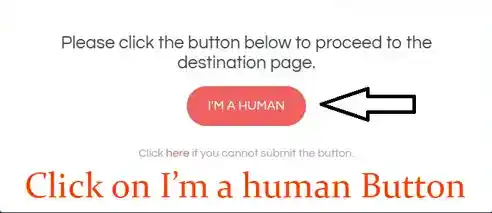
Step 1 – when you open an ouo link you will get a page like below, Just Click on I’m a Human button, check the image below:
Step 2 – wait few seconds here, and avoid everything else on this tab/window, dont click anywhere except Get Link button, check the image below:
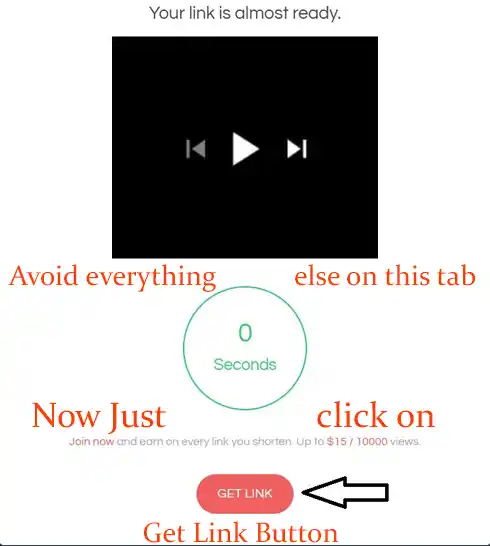
After that you will be redirected to main download link in the active tab, dont follow or open any popup/new window, hope it helps, let us know via comment if you have any questions.
Ouo not working for you?
Could be few reasons, ouo is blocked by in country DMCA rules or ISP, try below solutions:
If your browser blocks Ouo.io links then ignore the warning (Mostly Chrome Issue), or use a different browser, still if you cant open the links then use Opera Browser solution below, Close any ads that pop or open new window, also try changing the link domain from ouo.io to ouo.press, some users confirmed this trick worked for them, so give it a try.
If you are Still facing issue opening ouo shortener links then use a free VPN.
- For Chrome -> HotspotShield Free | Urban Free | CyberGhost Free
- For Firefox -> SetupVPN Free VPN | CyberGhost | Browsec VPN
or You can use Opera Browser, download opera from –> Here, it has a built in Free VPN, enable it and set the Virtual Location to Americas/Europe, then try to open all links, it works fine for most of the users.
Hope it helps you to go through the Ouo Shortener and get the download links.
Zipertogames Files Are Safe
Our all files are clean and scanned with Kaspersky Licensed Antivirus before Upload, so you are good to go.
There is no Malware/Viruses if you dont install them by yourself.
This is a Legit Site and Provides Proper Working ROM/ISO Files.
MegaUp Instructions
Any ADS/PopUp Window Open Just Close Them, 1-2 ads/popup might show which you need to close then press download now button for the file we’ve provided, on current tab .rar file with ‘Zipertogames’ tagged at the end will start downloading, until you get the File/ROM/RAR/ file ignore anything else, if you get an .exe file instead of a .rar then you’ve followed an ad not the proper download page, First learn how these file servers work, if you dont understand the process then try other mirror links, Note: We dont provide or there is no Malware/Viruses if you dont download & install them by yourself.
When you click on the download button, the wrong file is downloaded? Like .exe file, why?
It’s likely that advertising platforms, based on your interests, generated special content for you, just return to the page and try clicking on the download button again! 1/2 times max, we’ve said/answered this thousand times there is no .exe or installer uploaded by us, those are from random ADS which you followed blindly without even checking the page properly, so instead of blaming us learn to use them.
MegaDrive or Mega.nz Instructions
Create a free account first, then download the MegaSync app, login to the account from the app, keep the app running when you open a mega.nz link, click on download, you will notice app will capture the link and start downloading the file by itself, you can download 3-4GB data at a time, then you will have to wait 4-6hours for another data package, its just for the free account, if you need unlimited Data/Bandwidth then you will need to upgrade your account to premium.
How to Download from Google Drive:
Shorte will redirect you to Gdrive page, then just follow below instructions with (pictures):
Click on the Download button:
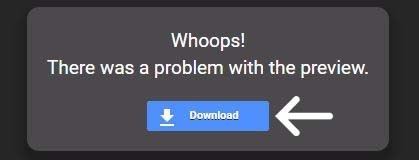
Or you can also click on the following logo, which will also take you to the main download page:

Now on the main page click on the Download Anyway Button:
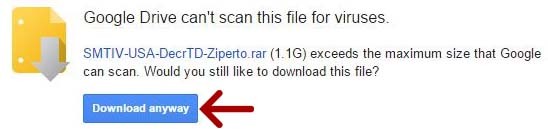
Download will start instantly, for getting the best speed from Google Drive we recommend Internet Download Manager.
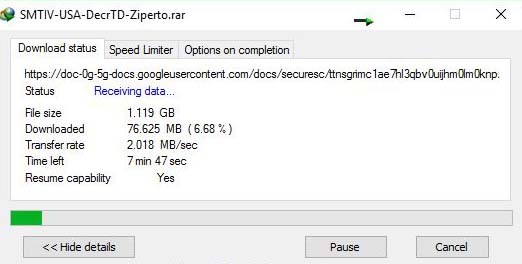
Hope this tutorial help you guys to understand the download process.
Back to Index
How to Extract (RAR) Parts?
Follow Below Steps:
- As we use WinRAR to make our RAR files so we recommend you to Install Updated WinRAR, Full Version (cracked) from Here or 7Zip and iZip Unarchiver for MAC
- Make sure you move all parts (2-10) into same folder, then right click on just First part and choose “Extract here”, You Don’t have to do this steps for each part, That will extract rest of the parts all together.
- For .001 – .002 File Steps is same as RAR Parts, but Recommend 7zip for this file format.
- If you are getting “There are some data after the end of the payload data” error means you are using 7-zip, change to WinRAR, [7zip often show this error while extracting .RAR files which were made by WinRAR]
- Sometimes you might face extract error cause of old WinRAR version, only solution to this is update your WinRAR to version v7 or above.
- If WinRAR or 7zip doesn’t work then try other compression tools, use google
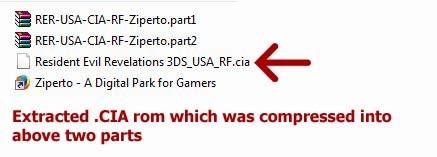
For better understanding check below images:
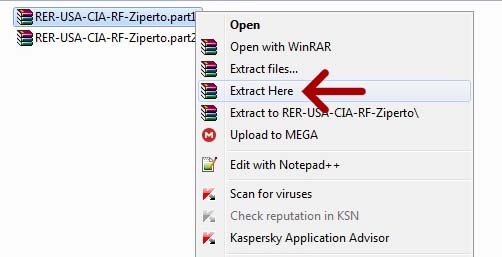
Give it some time for extraction, then you will get your game file in NSP/XCI/CIA format:
You Can Also Follow The Video for More Detailed Instructions –> Here
Hope it helps.
Back to Index
Whats the Password?
There was NONE, but From June 2026 we’ve started uploading few games with password, which is -> Zipertogames.com, Most of our files are Password Free and can be extracted with WinRar, 7zip or With any compression tools, sometime RAR file can ask for password if your WinRar version is Backdated/Older Version, or your Trial Winrar also can ask for password, so we suggest you to Update your WinRar software and if you can buy the Full Version or use the Cracked version which you can find Here
Back to Index
Games not Working, BlackScreen Issue or the Emulator Bug?
Most of the Emulators are not completely bug free, when playing with Emulator’s there is a chance that you will face issues which is not a Problem of the Game, Rom, ISO or our Uploads. Most of the games run/work on a real Console without any issues, Every game from every consoles are different, and not all games will work properly on the emulators or it might not work at all. There are a lots of things that can go wrong, which is why emulator developers has support section/page, so please ask emulation issues related questions to the emulator forums, the developers will and can provide the best solutions.
To Citra Emulator Users
————————————–
If you are facing problem on Citra Emulator then try with official latest builds or Unofficial Custom Builds, there are lots of 3DS game which don’t run well with official nightly/canary builds but works with custom builds, so try different builds coz there is no issue with any Decrypted ROMS that we uploaded, if still not working then let developer know about the issue on their support forums.
For your reference check the emulators forums list below:
Citra (3DS) – Citra Forum – Citra (Subreddit)
Cemu (WII U) – Cemu Subreddit – GBATemp Thread – Cemu Community
Back to Index
Note: There is one Experimental Emulator for PS Vita which is Vita3K
Follow and Ask All of your bugs/issues related questions about Vita3K Emulator to developer on their Official site Here, use their community platforms, Dont ask us anything about that, we will not replay until this Emulator reach a minimum stable stage.
You can check Vita3K Android Setup Guide -> Here
Also check our PS Vita Game Collection Here
Other ROM/ISO or This Type of Sites Linking or Promotion is Totally Forbidden/Not Allowed, for this we will delete comments without any warning.