
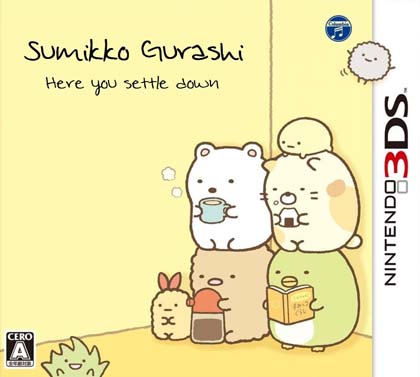
Sumikko Gurashi: Here You Settle Down — known in Japan as Sumikko Gurashi: Koko ga Ochitsukundesu — is a relaxed simulation game that landed on the Nintendo 3DS on November 20, 2014. Nippon Columbia developed and published it, and this release is the English-patched, decrypted ROM built for the Citra 3DS emulator on Windows. If you have been looking for a low-pressure, cozy title to run on your PC, this 56MB package gives you the full game with readable English text instead of the original Japanese menus and dialogue.
The premise is simple and charming: you gather the Sumikko Gurashi characters — the little creatures who prefer sitting quietly in corners — and build a comfortable space where they can settle down. There is no combat, no timer pressure, and no punishing difficulty curve. You decorate, you interact, and you watch the group go about their day. That gentle loop is exactly why the game has a following outside Japan, and why an English patch matters so much for players who want to actually understand what the characters are saying.
Technical Specifications
| Version | English Patched (estimated — original release November 20, 2014) |
| File Size | 56MB |
| Operating System | Windows (via Citra 3DS Emulator) |
| Category | Simulation |
| License | Free |
| Developer | Berry |
| Publisher | Nippon Columbia |
| Platform | Nintendo 3DS (Decrypted ROM) |
| Region | JPN |
| Languages | Japanese audio, English text (patched) |
What You Actually Do in Sumikko Gurashi: Here You Settle Down
This is a character-driven simulation, not a story campaign. You spend your time arranging a living space for the Sumikko Gurashi crew, interacting with each character, and watching small, quiet events unfold. The appeal sits in the atmosphere — soft visuals, a calm pace, and the personalities of the characters themselves. Because the English patch replaces the Japanese text, you can follow the dialogue, understand item names, and read the in-game prompts without guessing.
The ROM is decrypted, which means it is packaged for direct use with Citra rather than requiring a physical 3DS or a decryption step on your end. That is the practical difference between this file and an encrypted dump. You point Citra at the ROM, and the emulator handles the rest. For a game this small — 56MB — load times are short and the file is easy to store or move between machines.
Key Features
- English text patch applied: menus, dialogue, and item labels are readable in English, so you can play without Japanese language knowledge.
- Decrypted ROM format: built for Citra 3DS Emulator on Windows — no separate decryption process needed.
- Cozy simulation gameplay: arrange a space for the Sumikko Gurashi characters and interact with them at your own pace.
- No fail states or time pressure: a low-stress loop suited to short or long sessions.
- Small footprint: just 56MB, so it downloads quickly and fits easily on any drive.
- Faithful to the 2014 release: preserves the original Nippon Columbia game content, with the patch layered on top.
Pros & Cons
- Pros: English text makes the game genuinely playable for non-Japanese speakers; tiny 56MB download; decrypted format removes a setup hurdle; calm, accessible simulation that suits casual players.
- Cons: audio remains Japanese, so the patch covers text only; the game is niche and light on content compared to larger simulation titles; you need Citra and shared fonts configured, or you may hit archive/fatal errors; it is an emulator ROM, not a native Windows application.
Download Links
ENG (56MB) ——————————————
Trust Signals and Version Freshness
The original game shipped on November 20, 2014, and this English-patched decrypted build is the version distributed here. There is no separate version number beyond the patch designation, so treat any numeric version claim you see elsewhere with caution — the accurate label is simply “English Patched.” The developer credited on this release is Berry, while the game itself was developed and published by Nippon Columbia. Because this is a fan-patched ROM rather than an official localization, patch quality can vary across scenes, and some text may read awkwardly.
On installation: extract the RAR with WinRAR or 7-Zip, then load the resulting ROM in Citra. If Citra asks for archive files or throws fatal errors, grab the shared fonts from the Citra setup page linked below. There is no password on the game files here, and the package is a single part — you do not need to collect multiple volumes. If a link is dead, use the reupload request path rather than hunting for mirrors.
Who This Is For
You will get the most from this ROM if you enjoy slow, character-focused simulation games and already have Citra running on Windows. It is a poor fit if you want action, progression systems, or a fully localized experience with English voice work. Fans of the Sumikko Gurashi franchise who want to explore the series beyond the Switch entries may also want to look at Eiga Sumikko Gurashi: Sora no Okoku to Futari no Ko Asobo Kyara Kurosu, which brings the characters to a newer platform.
Setup Notes
- Get the shared fonts from the Citra 3DS Emulator page if Citra prompts for archive files or shows fatal errors.
- Use WinRAR or 7-Zip to extract the RAR; older archiver versions sometimes request passwords that are not actually set.
- If an archive reports damage or a CRC error, re-download the file — the package is a single 56MB part.
- Broken or missing links can be reported through the reupload request page.
More to Play
If you like narrative-driven titles alongside your simulation picks, Where the Water Tastes Like Wine offers a very different pace, and Heretic’s Fork covers the action-strategy side of the catalog.
If you enjoy this game, support the developers by purchasing an official copy.
Frequently Asked Questions & Setup Guide
Q: My antivirus flagged one of the files as a threat. Is this game safe?
A: Yes, all files on our site are 100% verified clean. Antivirus software may occasionally flag steam_api.dll or crack files as false positives due to modified game binaries. Temporarily whitelist the game directory before extracting.
Q: I get a missing DLL error (e.g., VCRUNTIME140.dll, MSVCP140.dll, or D3DCOMPILER). How do I fix it?
A: Missing DLL errors indicate missing Windows system libraries. Ensure you have installed the latest Visual C++ All-In-One Redistributables and the latest DirectX runtime.
Q: Where are my game save files located?
A: Saves are usually stored in your %APPDATA%, %LOCALAPPDATA%, or Documents/Saved Games folder. Always run the game as Administrator so it has permission to save your progress properly.
Q: Can I play online or multiplayer with friends?
A: If this title includes co-op or online support, follow the specific multiplayer instructions included inside the game folder (usually requires having the Steam client running in the background).









