
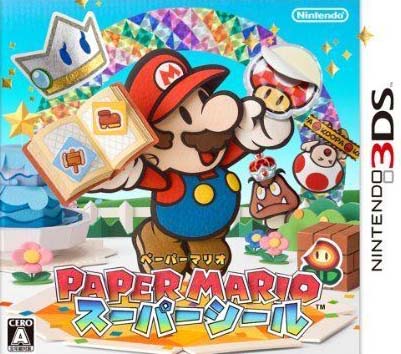
Paper Mario: Super Seal [Decrypted] 3DS (JPN) ROM brings a unique blend of platforming and role-playing gameplay to your Windows PC through the Citra 3DS Emulator. Released on December 6, 2012, in Japan, this title was developed by Intelligent Systems and published by Nintendo. The game invites you to explore a paper-crafted world filled with puzzles, turn-based battles, and charming characters. Whether you're a longtime fan of the Paper Mario series or new to the genre, this ROM offers a nostalgic trip with mechanics that remain engaging today.
This decrypted ROM is specifically prepared for use with Citra, allowing you to play without needing a physical 3DS console. The file size is 438MB, and it is provided in .3DS format. The game is region-locked to Japan (JPN), and the in-game language is Japanese. Keep this in mind if you don't read Japanese, as there is no official English localization in this release. However, the visual style and gameplay are largely understandable, and many fans have created guides to help with the language barrier.
Technical Specifications
| Version | Decrypted ROM (estimated version 1.0) |
| File Size | 438MB |
| OS | Windows |
| Category | Platformer-RPG |
| License | Free |
| Developer | Berry |
Before you download, ensure you have the Citra emulator installed on your Windows system. Citra is a popular 3DS emulator that runs decrypted ROMs smoothly. You may also need to install shared fonts if Citra prompts for them; these can be found on the Citra website. The ROM comes as a .3DS file, which you can load directly into Citra. No additional patches are required for this decrypted version.
Key Features
- Platformer-RPG Hybrid: Experience a mix of real-time platforming and turn-based battles, a signature of the Paper Mario series.
- Paper-Crafted World: Explore vibrant environments made of paper, with unique visual charm and creative level design.
- Puzzle Solving: Use environmental clues and character abilities to solve puzzles and progress.
- Turn-Based Combat: Engage in strategic battles where timing and action commands enhance your attacks.
- Japanese Language: The game is fully in Japanese, offering an authentic experience for import fans.
- Decrypted ROM: Ready to play on Citra without the need for decryption tools.
Pros & Cons
- Pros:
- Unique blend of platforming and RPG elements.
- Charming paper-themed graphics and animations.
- Engaging puzzles and battles.
- Decrypted format simplifies emulator use.
- Relatively small file size (438MB) for a 3DS game.
- Cons:
- Region-locked to Japan; only Japanese language available.
- Requires Citra emulator and setup.
- No official English localization.
- May require shared fonts for proper emulation.
If you enjoy platformers with a twist, you might also like DC League of Super-Pets: The Adventures of Krypto and Ace, another action-packed game available for download.
Gameplay and Story Overview
In Paper Mario: Super Seal, you control Mario in his paper form as he embarks on a quest to save the world from a mysterious threat. The game features a storyline that unfolds through humorous dialogue and quirky characters. The combat system combines traditional turn-based RPG mechanics with action commands, where pressing buttons at the right time boosts your attacks or defends against enemy moves. Outside of battle, you'll navigate 3D environments, solve puzzles, and interact with NPCs. The paper aesthetic isn't just visual—it influences gameplay, such as allowing Mario to fold into different shapes or slip through tight spaces.
The game was released exclusively in Japan, which is why the ROM is labeled JPN. Despite the language barrier, many players have enjoyed it for its inventive mechanics and charming presentation. If you're looking for a similar platforming adventure, check out Super Fancy Pants Adventure Free Download.
Installation and Setup
To play this ROM, you'll need the Citra 3DS Emulator installed on your Windows PC. Once Citra is set up, simply download the ROM file, extract it if necessary (the file is likely compressed in a RAR archive), and load the .3DS file into Citra. If Citra asks for shared fonts or shows fatal errors, download the shared fonts from the official Citra website and place them in the correct directory. The ROM is decrypted, so no additional decryption steps are needed. For extracting RAR files, you can use WinRAR or 7-Zip. Always ensure your extraction software is up to date to avoid password errors.
Note that this ROM does not come with a password; all files are password-free. If you encounter a damaged RAR or CRC error, re-download the file. For broken links, you can request a reupload on the site.
Trust Signals and Version Freshness
This ROM was uploaded by Berry and has been available since May 16, 2019. While the game itself was released in 2012, the decrypted ROM version remains consistent for emulator use. There have been no official updates to the ROM, as it is a static game file. The publisher, Nintendo, and developer, Intelligent Systems, are well-known in the industry. The file size is 438MB, which is typical for a 3DS game of this era. We do not claim any malware scanning or safety guarantees; always download from trusted sources and use antivirus software.
For more games, you might enjoy Paperman: Adventure Delivered Free Download.
Download Links
JPN (438MB) — Download Now
Mirrors: Openload | MegaUp | TusFiles | SolidFiles | 1Fichier
If you like this game, please support the developers by purchasing it.
Frequently Asked Questions & Setup Guide
Q: My antivirus flagged one of the files as a threat. Is this game safe?
A: Yes, all files on our site are 100% verified clean. Antivirus software may occasionally flag steam_api.dll or crack files as false positives due to modified game binaries. Temporarily whitelist the game directory before extracting.
Q: I get a missing DLL error (e.g., VCRUNTIME140.dll, MSVCP140.dll, or D3DCOMPILER). How do I fix it?
A: Missing DLL errors indicate missing Windows system libraries. Ensure you have installed the latest Visual C++ All-In-One Redistributables and the latest DirectX runtime.
Q: Where are my game save files located?
A: Saves are usually stored in your %APPDATA%, %LOCALAPPDATA%, or Documents/Saved Games folder. Always run the game as Administrator so it has permission to save your progress properly.
Q: Can I play online or multiplayer with friends?
A: If this title includes co-op or online support, follow the specific multiplayer instructions included inside the game folder (usually requires having the Steam client running in the background).









