About Make it! Gyoza on Nintendo Switch
Step into the steamy, flour-dusted world of 'Make it! Gyoza,' where you play as a young apprentice chef tasked with reviving your grandmother's legendary dumpling shop. The story unfolds through charming comic-panel cutscenes as you travel across a vibrant culinary landscape, challenging rival cooks and gathering secret recipes. Your goal is simple yet compelling: master the art of gyoza-making, earn the respect of the Gyoza Guild, and restore your family's honor one plate at a time. The atmosphere blends cozy kitchen chaos with a lighthearted underdog narrative, making every fold and fry feel like a step toward redemption.
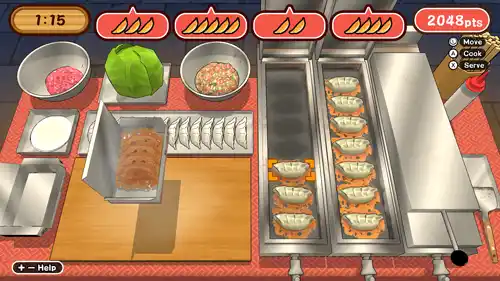
At its core, 'Make it! Gyoza' is a frantic action-puzzle hybrid where you race against the clock to prepare perfect dumplings. You'll chop ingredients, mix fillings, fold wrappers with precise timing, and pan-fry to golden perfection—all while managing orders that grow increasingly complex. Each level introduces new challenges, from picky customers to sabotaging rivals who toss obstacles onto your counter. Controls are intuitive: button prompts for chopping, motion gestures for folding, and rhythmic taps for frying. Boss battles turn cooking into combat, with puzzle-like sequences where you must counter enemy moves by assembling specific gyoza combos. Progression unlocks new recipes, kitchen upgrades, and harder difficulties, keeping the pressure deliciously high.
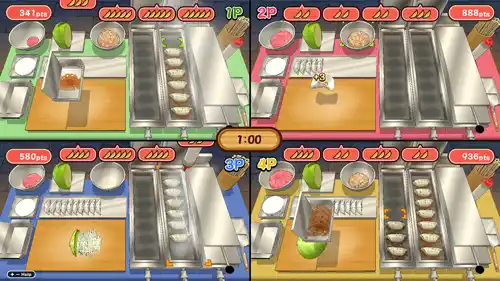
Visually, 'Make it! Gyoza' bursts with colorful, cartoonish charm—steam rises from pans, vegetables glisten, and characters have expressive, anime-inspired designs. The soundtrack is a lively mix of upbeat jazz and traditional Japanese instruments, with satisfying sizzles and crunches that make cooking feel tactile. On Switch, performance is smooth in both handheld and docked modes; handheld offers crisp, touch-friendly menus, while docked mode shines with local party play for up to four players. Replay value is strong thanks to unlockable recipes, score-chasing challenges, and a chaotic multiplayer mode that turns dumpling-making into a friendly food fight. Whether you're a solo chef or a party host, this game serves up endless helpings of fun.
Key Features & Highlights
- Fast-paced action-puzzle gameplay that blends ingredient prep, folding, and frying under time pressure.
- Story-driven campaign with charming characters, rival chefs, and a heartwarming quest to save a family shop.
- Unique boss battles that mix cooking mechanics with puzzle-combat against sabotage-prone rivals.
- Local multiplayer party mode for up to four players, perfect for chaotic couch competitions.
- Extensive unlockables including recipes, kitchen upgrades, and difficulty tiers for high replayability.
Gameplay Screenshots
Installation & Emulation Guide
🎮 How to Install on Nintendo Switch (Atmosphere CFW)
- Ensure your Nintendo Switch is running the latest Atmosphere CFW and meets the required firmware (Base – v21.2.0 | Update – v22.0.0).
- Connect your Switch to your computer via USB and launch DBI (MTP Responder) or Tinfoil.
- Drag and drop the
.NSPor.XCIfile into the MicroSD Install or NAND Install drive. - Install the Base Game first, followed by the latest Update and any optional DLC packs.
💻 How to Play on PC (Ryujinx & Sudachi Emulators)
- Download and set up Ryujinx Canary or your preferred Nintendo Switch emulator.
- Install the matching
prod.keysand firmware files into the emulator system directory. - Add your game directory in emulator settings and double-click Make it! Gyoza to play with full controller support and upscaled resolution.
⬇️ Download Make it! Gyoza (Nintendo Switch)
📦 Download (Base Game) Links: NSP [eShop] – (132MB)
Frequently Asked Questions
Q: What firmware version is needed to run Make it! Gyoza?
A: This game requires firmware Base – v21.2.0 | Update – v22.0.0 or higher on your Nintendo Switch or PC emulator.
Q: Do the downloaded game archives require a password?
A: No. All download archives provided on Zipertogames are 100% password-free. Simply extract them using 7-Zip or WinRAR (v6.0+).
Q: In what sequence should I install Base, Update, and DLC files?
A: Always install the Base Game (.NSP or .XCI) first. Once complete, install the latest Update, followed by any optional DLC files.
Q: How do I extract multi-part RAR files (.part1.rar, .part2.rar)?
A: Download all parts into the same folder, right-click on .part1.rar, and select Extract Here. 7-Zip or WinRAR will automatically reconstruct the entire file.


