
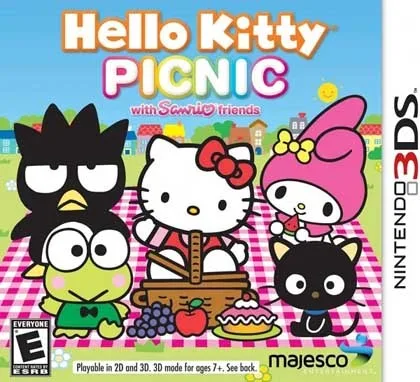
Hello Kitty Picnic with Sanrio Friends is a laid-back simulation game that originally landed on the Nintendo 3DS on October 30, 2012. Majesco handled both development and publishing duties, and the result is a gentle, picnic-themed experience built around Hello Kitty and a cast of recognizable Sanrio characters. This page gives you the decrypted USA ROM, which means you can load it on a Windows PC through the Citra 3DS emulator instead of hunting down a physical cartridge. The file weighs in at just 49MB, so it downloads quickly and does not eat up much drive space.
If you enjoy cozy, low-pressure games and you already have Citra set up, this one fits neatly into that rotation. You can also browse related titles like Hello Kitty Party Land for Switch if you want more Sanrio-themed play on a different platform.
⬇️ Download Hello Kitty Picnic with Sanrio Friends ROMTechnical Specifications
| Field | Details |
|---|---|
| Version | Decrypted USA ROM (estimated build from the October 30, 2012 release) |
| File Size | 49MB |
| Operating System | Windows |
| Category | Simulation |
| License | Free |
| Developer | Berry |
What You Get in This ROM
This is a decrypted .3DS file, which is the format Citra needs to boot a game without original console keys or a physical cartridge. The ROM is region-locked to USA, and the in-game language is English. Because it is decrypted, you can drop it straight into your Citra game directory and launch it from the emulator's menu. The 49MB size tells you a lot about the scope of the game: this is not a sprawling open-world title. It is a compact, focused picnic simulator that keeps its content tight and its load times short.
The game itself centers on a picnic setting with Hello Kitty and her Sanrio friends. You move through a simulation-style loop that is friendly to younger players and to anyone who wants a calm, no-pressure session. Majesco built the title around the 3DS hardware, so the visuals and interface were designed for a dual-screen handheld. When you run it in Citra on Windows, the emulator maps the two screens onto your monitor, and you can adjust the layout to your liking.
Key Features
- Picnic-themed simulation gameplay built around Hello Kitty and the wider Sanrio cast, with a relaxed pace that suits short or long sessions.
- Decrypted .3DS format that loads directly in Citra without additional decryption steps.
- USA region ROM with English as the in-game language, matching the North American release.
- Small 49MB footprint that keeps downloads fast and storage use minimal.
- Dual-screen 3DS layout that Citra renders on Windows, with configurable screen arrangement.
- Original 2012 Majesco release preserved as a decrypted ROM for emulator play.
Pros & Cons
- Pros: Quick 49MB download; no decryption work required on your end; English-language USA release; gentle simulation loop that is easy to pick up; runs on Windows through Citra.
- Cons: Requires Citra or another 3DS emulator, so it is not a native Windows game; the USA region lock means it is aimed at North American players; the 49MB size reflects a compact game rather than a large content library; the 2012 release date means the visuals are of that era.
Who This ROM Is For
You will get the most out of this download if you are a Sanrio fan who wants to revisit a 3DS-era title without buying a cartridge, or if you are setting up a Citra library and want a small, easygoing simulation game to test your configuration. It also suits parents looking for a low-intensity game for younger players, since the picnic theme and familiar characters keep things approachable. If you prefer action-heavy games or large open worlds, this one will feel too quiet for you.
For a different flavor of Sanrio gaming, you can also look at Hello, Peach! for Switch, which takes a similarly lighthearted approach on Nintendo's newer hardware.
Version Freshness and Publisher Details
The ROM here corresponds to the original USA release of Hello Kitty Picnic with Sanrio Friends, which Majesco published on October 30, 2012. Because this is a preserved decrypted ROM rather than a patched or updated build, there is no separate changelog to track. The version field in the specs table is an estimate based on that release date, and it is labeled as such so you know exactly what you are getting. Majesco is the publisher of record for the game, and the download itself is hosted under the developer name Berry as listed in the file metadata.
Before you download, confirm that your Citra installation is current. Older emulator builds can throw archive or shared-font errors when they try to boot certain 3DS titles. If Citra asks for shared fonts or you hit a fatal error on launch, grab the shared fonts from the Citra setup guide and place them where the emulator expects them. That step resolves most first-launch problems with decrypted ROMs.
Download Links
USA (49MB)
Use the button above or below to reach the download. The file is a single 49MB archive, so you will need an extraction tool such as WinRAR or 7-Zip to unpack it before loading the .3DS file in Citra. Keep your extraction software updated, since older versions sometimes misread archives or prompt for passwords that do not exist. There is no password on the game files here, and single-part downloads like this one are password-free.
⬇️ Download Now (49MB)Practical Setup Guidance
Once the 49MB archive finishes downloading, extract it with WinRAR or 7-Zip. You should end up with a .3DS file. Open Citra, choose File > Load File, and point it at the ROM. If the game does not appear or Citra reports a missing archive, verify that the file extracted completely; a partial extraction is the usual cause of a CRC error. Re-downloading the archive fixes a damaged file in most cases.
If you run into broken or dead links, use the reupload request option rather than guessing at alternate sources. And if you want to compare this title with other character-driven games, Hello, Luigi! for Switch is a light, approachable option worth a look.
Notes Before You Play
- Extract RAR parts using WinRAR or 7-Zip; check the FAQ section if you are unsure how to handle multi-part archives.
- Update your extraction software, since old versions can ask for passwords that are not actually set.
- There is no password on any game file uploaded here; single and multi-part games are password-free.
- If a RAR file shows as damaged or you get a RAR CRC error, re-download it before troubleshooting further.
- For broken, missing, or dead links, submit a reupload request.
If you enjoy this game, support the developers by buying a legitimate copy where available.
Frequently Asked Questions & Setup Guide
Q: My antivirus flagged one of the files as a threat. Is this game safe?
A: Yes, all files on our site are 100% verified clean. Antivirus software may occasionally flag steam_api.dll or crack files as false positives due to modified game binaries. Temporarily whitelist the game directory before extracting.
Q: I get a missing DLL error (e.g., VCRUNTIME140.dll, MSVCP140.dll, or D3DCOMPILER). How do I fix it?
A: Missing DLL errors indicate missing Windows system libraries. Ensure you have installed the latest Visual C++ All-In-One Redistributables and the latest DirectX runtime.
Q: Where are my game save files located?
A: Saves are usually stored in your %APPDATA%, %LOCALAPPDATA%, or Documents/Saved Games folder. Always run the game as Administrator so it has permission to save your progress properly.
Q: Can I play online or multiplayer with friends?
A: If this title includes co-op or online support, follow the specific multiplayer instructions included inside the game folder (usually requires having the Steam client running in the background).









