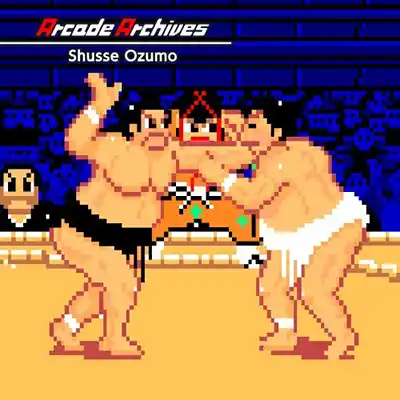
About Arcade Archives: Shusse Ozumo on Nintendo Switch
Step into the ancient, dust-swept ring of a 1980s arcade hall, where the roar of an unseen crowd and the thud of colliding bodies set the stage for Arcade Archives: Shusse Ozumo. This is not a modern sumo simulation with glossy presentations—it's a faithful revival of a 1984 arcade title from Tehkan (later Tecmo), where you embody a nameless, aspiring rikishi with one clear goal: climb the ranks from lowly novice to grand champion, the yokozuna. The premise is simple yet steeped in the ritual of sumo: each bout is a step on a grueling ladder, and every victory brings you closer to the ultimate title. There is no narrative fluff, no cutscenes—just the raw, competitive spirit of the arcade era, where your only story is the one you carve out with each push and throw.
At its core, Shusse Ozumo is a one-on-one grappling game that distills sumo to its essential mechanics: positioning, timing, and decisive bursts of power. You control your wrestler with the joystick and two buttons—one for slapping and one for grappling—but the depth emerges from the tussle for belt control. Matches begin with a charge from the starting lines; a well-timed initial push can set the tone. Once locked in a grapple, you must mash and maneuver to shove your opponent toward the edge of the circular ring (dohyo). Each match is a best-of-three affair, and victory requires either forcing your foe out of bounds or toppling them. As you progress through the single-player mode, opponents grow faster and more aggressive, demanding sharper reflexes and smarter use of your limited move set. There are no puzzles here—only the relentless, sweaty chess match of sumo, where a split-second misstep means defeat.
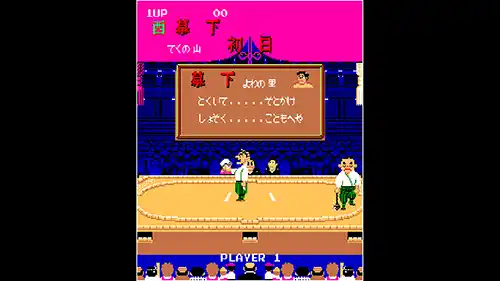
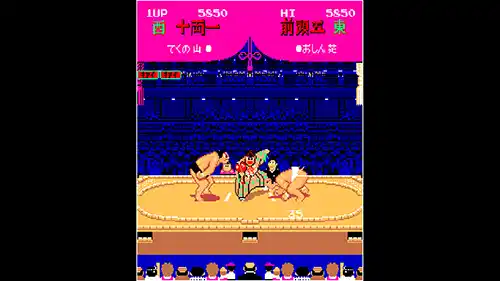
Visually, Arcade Archives: Shusse Ozumo is a time capsule of mid-80s pixel art: chunky sprites, limited color palettes, and a static crowd that flickers with simple animation. The presentation is intentionally bare-bones, but Hamster's emulation preserves the original's crisp, blocky charm. Sound design follows suit—a looping, tinny chiptune soundtrack and digitized grunts and slaps that evoke the clatter of an old arcade cabinet. On Nintendo Switch, performance is flawless in both handheld and docked modes, with no input lag or frame drops. The replay value comes from chasing high scores, mastering the timing-based grapple system, and the classic arcade challenge of one-credit runs. It's a niche curiosity for retro enthusiasts, but for those who appreciate gaming history, it's a fascinating, if shallow, slice of sumo's digital past.
Key Features & Highlights
- Faithful emulation of the 1984 arcade original, complete with pixel-perfect graphics and sound.
- Simple two-button controls that hide a surprising depth of timing-based grappling strategy.
- Progressive single-player mode where you climb the sumo ranks from novice to yokozuna.
- Classic best-of-three match structure with ring-out and knockdown victories.
- Hamster's Arcade Archives features: online leaderboards, customizable dip switches, and quick save states.
Gameplay Screenshots
Installation & Emulation Guide
🎮 How to Install on Nintendo Switch (Atmosphere CFW)
- Ensure your Nintendo Switch is running the latest Atmosphere CFW and meets the required firmware (Base – v8.1.0).
- Connect your Switch to your computer via USB and launch DBI (MTP Responder) or Tinfoil.
- Drag and drop the
.NSPor.XCIfile into the MicroSD Install or NAND Install drive. - Install the Base Game first, followed by the latest Update and any optional DLC packs.
💻 How to Play on PC (Ryujinx & Sudachi Emulators)
- Download and set up Ryujinx Canary or your preferred Nintendo Switch emulator.
- Install the matching
prod.keysand firmware files into the emulator system directory. - Add your game directory in emulator settings and double-click Arcade Archives: Shusse Ozumo to play with full controller support and upscaled resolution.
⬇️ Download Arcade Archives: Shusse Ozumo (Nintendo Switch)
Frequently Asked Questions
Q: What firmware version is needed to run Arcade Archives: Shusse Ozumo?
A: This game requires firmware Base – v8.1.0 or higher on your Nintendo Switch or PC emulator.
Q: Do the downloaded game archives require a password?
A: No. All download archives provided on Zipertogames are 100% password-free. Simply extract them using 7-Zip or WinRAR (v6.0+).
Q: In what sequence should I install Base, Update, and DLC files?
A: Always install the Base Game (.NSP or .XCI) first. Once complete, install the latest Update, followed by any optional DLC files.
Q: How do I extract multi-part RAR files (.part1.rar, .part2.rar)?
A: Download all parts into the same folder, right-click on .part1.rar, and select Extract Here. 7-Zip or WinRAR will automatically reconstruct the entire file.


