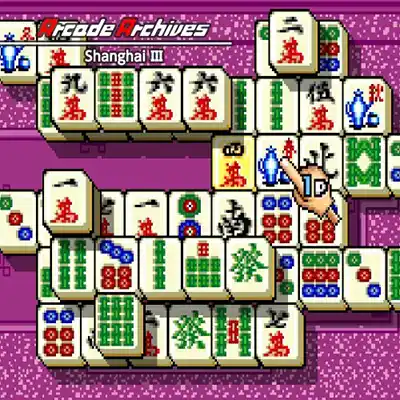
About Arcade Archives Shanghai III on Nintendo Switch
Slip into a tranquil, dimly lit room where the only sound is the soft clack of tiles and the occasional chime of a completed puzzle. Arcade Archives Shanghai III is not a game of heroes or villains, but of quiet concentration and ancient tradition. You take on the role of a solitary puzzle solver, presented with a towering stack of Mahjong tiles arranged in intricate formations. The goal is simple yet demanding: clear the entire board by matching pairs of identical tiles, but only if they can be connected by a path of no more than three straight lines. This digital recreation of the classic Shanghai series invites you to lose yourself in a meditative challenge that has captivated players for generations.
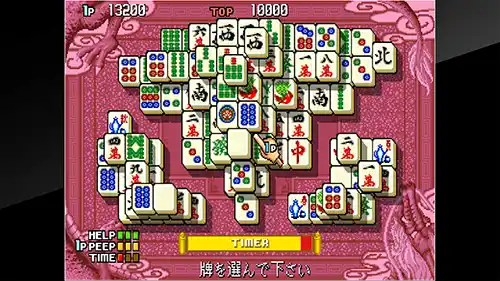
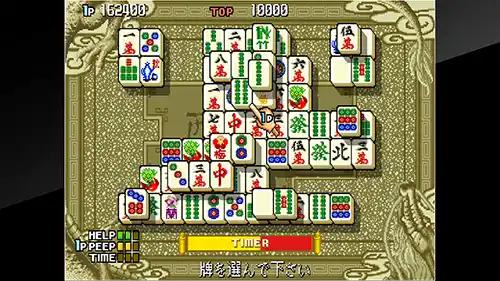
At its core, Shanghai III tasks you with methodically dismantling layered tile arrangements by selecting matching pairs that are 'free'—meaning they have at least one open side and can be linked by a path with two or fewer turns. Each level presents a new layout, from simple pyramids to complex dragons and bridges, with difficulty escalating through denser stacks and more deceptive tile placements. Controls are intuitive: use the D-pad or left stick to move a cursor, and press A to select a tile. A hint system offers limited assistance, while a timer adds gentle pressure. There is no combat, but the puzzle itself is the adversary, requiring foresight and spatial reasoning to avoid dead ends. Progression is linear, with each solved board unlocking the next, and the satisfaction of a perfect clear is its own reward.
Visually, Shanghai III embraces a clean, uncluttered aesthetic with crisp tile designs and subtle background patterns that keep the focus on the board. The sound design is minimalist, featuring soft ambient tones and satisfying clicks that enhance the zen-like atmosphere. On Nintendo Switch, the game performs flawlessly in both handheld and docked modes, with responsive controls and no noticeable slowdown. The pick-up-and-play nature makes it ideal for short sessions, while the challenging later levels offer substantial replay value for puzzle enthusiasts. Hamster's Arcade Archives treatment ensures authentic emulation, complete with options for display filters and save states, making this a polished and faithful port of a timeless classic.
Key Features & Highlights
- Classic Mahjong solitaire gameplay with over 100 intricate tile layouts to clear.
- Intuitive controls using the Joy-Con or Pro Controller, with touchscreen support in handheld mode.
- Authentic arcade emulation by Hamster, including original difficulty and display settings.
- Meditative sound design and clean visuals that create a relaxing, focused experience.
- Save states and leaderboards for tracking progress and competing for high scores.
Gameplay Screenshots
Installation & Emulation Guide
🎮 How to Install on Nintendo Switch (Atmosphere CFW)
- Ensure your Nintendo Switch is running the latest Atmosphere CFW and meets the required firmware (Base – v10.2.0).
- Connect your Switch to your computer via USB and launch DBI (MTP Responder) or Tinfoil.
- Drag and drop the
.NSPor.XCIfile into the MicroSD Install or NAND Install drive. - Install the Base Game first, followed by the latest Update and any optional DLC packs.
💻 How to Play on PC (Ryujinx & Sudachi Emulators)
- Download and set up Ryujinx Canary or your preferred Nintendo Switch emulator.
- Install the matching
prod.keysand firmware files into the emulator system directory. - Add your game directory in emulator settings and double-click Arcade Archives Shanghai III to play with full controller support and upscaled resolution.
⬇️ Download Arcade Archives Shanghai III (Nintendo Switch)
Frequently Asked Questions
Q: What firmware version is needed to run Arcade Archives Shanghai III?
A: This game requires firmware Base – v10.2.0 or higher on your Nintendo Switch or PC emulator.
Q: Do the downloaded game archives require a password?
A: No. All download archives provided on Zipertogames are 100% password-free. Simply extract them using 7-Zip or WinRAR (v6.0+).
Q: In what sequence should I install Base, Update, and DLC files?
A: Always install the Base Game (.NSP or .XCI) first. Once complete, install the latest Update, followed by any optional DLC files.
Q: How do I extract multi-part RAR files (.part1.rar, .part2.rar)?
A: Download all parts into the same folder, right-click on .part1.rar, and select Extract Here. 7-Zip or WinRAR will automatically reconstruct the entire file.


