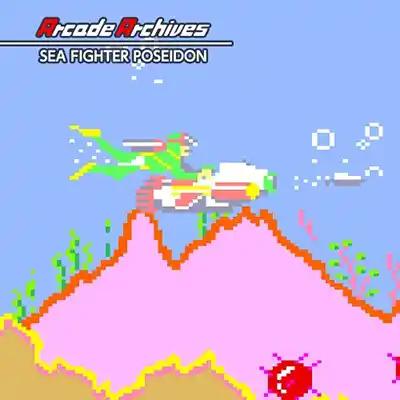
About Arcade Archives: Sea Fighter Poseidon on Nintendo Switch
Dive into the depths of a forgotten arcade classic with Arcade Archives: Sea Fighter Poseidon, a faithful port of the 1984 Taito underwater shooter. You pilot the titular Sea Fighter, a cutting-edge submarine tasked with defending humanity from a relentless alien invasion that has breached the ocean's surface. The narrative is minimal but effective: Earth's last hope rests on your torpedoes as you navigate treacherous undersea caverns, destroy enemy installations, and confront the alien mothership. The game's atmosphere is thick with aquatic tension, from the murky blue depths to the ominous silhouette of enemy subs, evoking the era of quarter-munching arcade challenges. Your goal is simple yet demanding: survive, destroy, and save the world—one torpedo at a time.
At its core, Sea Fighter Poseidon is a side-scrolling shooter that demands precision and pattern recognition. You control the submarine with the left stick, aim with the right, and fire torpedoes to obliterate enemy subs, mines, and turrets. The challenge ramps up quickly as you dodge incoming fire and navigate narrow passages, with each level introducing new enemy types and obstacles. Controls are responsive, with a dedicated button for rapid-fire and another for evasive maneuvers, though the classic arcade difficulty means one hit sends you back to the start of the section. Level progression is linear, culminating in boss battles against massive alien vessels that require timing and strategic aiming to exploit weak points. There are no puzzles per se, but the environmental hazards and enemy patterns create a puzzle-like rhythm to master.
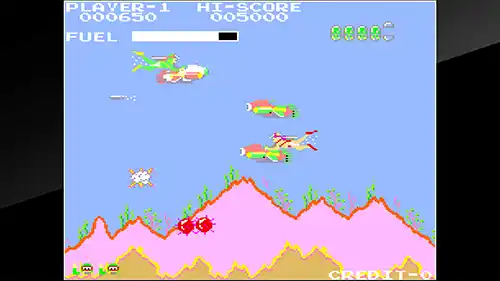
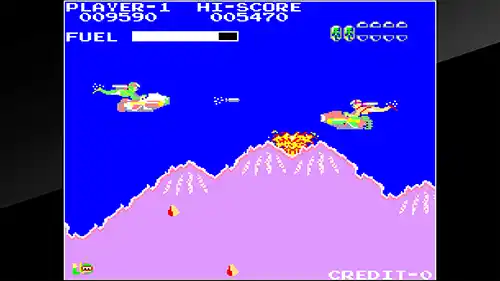
Visually, the game retains its 8-bit charm with crisp pixel art and vibrant underwater colors, and Hamster's emulation ensures a smooth 60fps experience both in handheld and docked modes. The sound design features classic chiptune effects and a driving soundtrack that immerses you in the arcade atmosphere, though the repetitive loops may wear thin over time. On Switch, the game performs flawlessly with no input lag, and the added features like save states and online leaderboards enhance replay value. While the lack of additional content might deter some, the addictive score-chasing gameplay and the ability to compete globally make it a worthy addition for retro enthusiasts.
Key Features & Highlights
- Faithful emulation of the 1984 arcade classic with accurate controls and visuals.
- Online leaderboards for global score competition and replayability.
- Save state and rewind features to practice difficult sections.
- Two-player local co-op for shared underwater action.
- Handheld and docked modes both run at a smooth 60fps with no performance issues.
Gameplay Screenshots
Installation & Emulation Guide
🎮 How to Install on Nintendo Switch (Atmosphere CFW)
- Ensure your Nintendo Switch is running the latest Atmosphere CFW and meets the required firmware (Base – v10.2.0 | Update – v13.2.0).
- Connect your Switch to your computer via USB and launch DBI (MTP Responder) or Tinfoil.
- Drag and drop the
.NSPor.XCIfile into the MicroSD Install or NAND Install drive. - Install the Base Game first, followed by the latest Update and any optional DLC packs.
💻 How to Play on PC (Ryujinx & Sudachi Emulators)
- Download and set up Ryujinx Canary or your preferred Nintendo Switch emulator.
- Install the matching
prod.keysand firmware files into the emulator system directory. - Add your game directory in emulator settings and double-click Arcade Archives: Sea Fighter Poseidon to play with full controller support and upscaled resolution.
⬇️ Download Arcade Archives: Sea Fighter Poseidon (Nintendo Switch)
Frequently Asked Questions
Q: What firmware version is needed to run Arcade Archives: Sea Fighter Poseidon?
A: This game requires firmware Base – v10.2.0 | Update – v13.2.0 or higher on your Nintendo Switch or PC emulator.
Q: Do the downloaded game archives require a password?
A: No. All download archives provided on Zipertogames are 100% password-free. Simply extract them using 7-Zip or WinRAR (v6.0+).
Q: In what sequence should I install Base, Update, and DLC files?
A: Always install the Base Game (.NSP or .XCI) first. Once complete, install the latest Update, followed by any optional DLC files.
Q: How do I extract multi-part RAR files (.part1.rar, .part2.rar)?
A: Download all parts into the same folder, right-click on .part1.rar, and select Extract Here. 7-Zip or WinRAR will automatically reconstruct the entire file.


